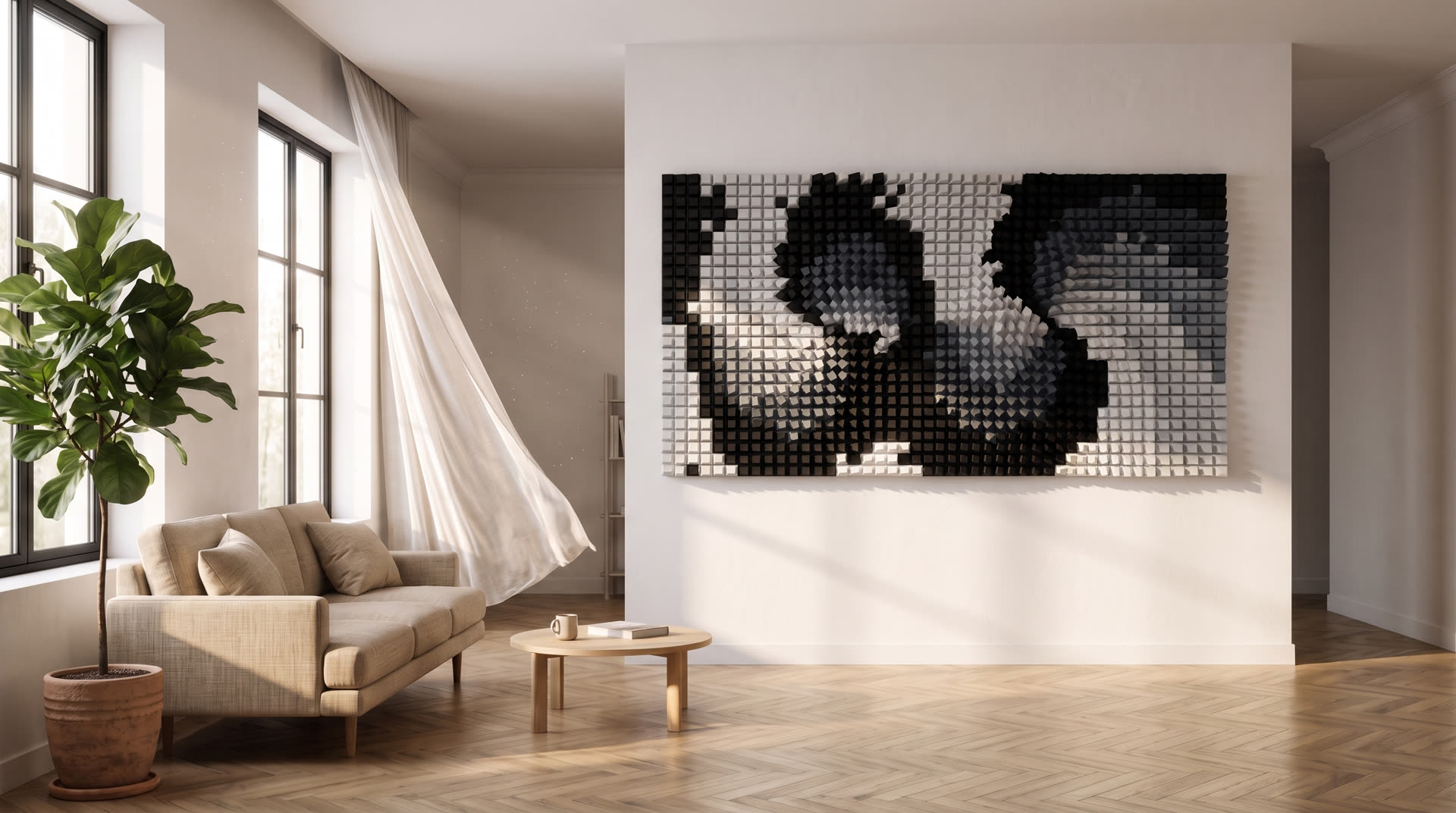
Living room with the assembled WallArt panel on the wall
Active magnets 0

Coming soon Parametric 3D wall art generator

Pull the magnet.
The wall builds itself.

Tune color, height and motion in real time — then download a multicolor file that's ready to print. No modeling. No rework.

Live preview = final file

What's on screen is the mesh that reaches the printer.

It isn't a pretty approximation that turns into something else in the slicer. You drag the magnet, tune the color and height of each layer, and what the camera shows is exactly the result — no modeling, no surprises at print time.

How it works

The magnet is what draws.

A magnet is a point of attraction you drop onto the grid. Pieces near it spin, rise and tilt; pieces far from it stay still. Dragging the magnet is the gesture that draws the panel — instead of modeling piece by piece, you move the field and the whole mesh answers.

True multicolor

Every piece is born in the right color.

Each piece exports as its own independent part, already assigned to an extruder. The file opens in the slicer with colors separated — this isn't surface painting, it's a real filament change per piece.

Printable by construction

Print physics already lives inside the geometry.

Walls too thin, pieces that collide, open meshes, models larger than the bed — in WallArt those conditions simply don't exist in the file.

Formats and file

It splits across the beds.

The mural separates into printer plates, each already carrying its part of the drawing and its colors. From a small frame to murals over a meter wide.

Three families of art

Each family is its own geometric construction.

These aren't presets of the same generator — they're different rules, each with its own character.

01 / Waves

Fluid, organic, water.

Continuous ribbons that cross the panel and bend around the magnets, with a soft relief.

02 / Twisted Blocks

Kinetic, architectural, optical illusion.

Blocks that twist on their own axis while holding their form — like wrung paper boxes.

03 / Hexagons

Natural, modular, hive.

A honeycomb of hexagonal prisms that twist and undulate.

Controls

A studio, not a catalog.

WallArt does not choose for you. It gives you visual controls, preserves physical rules, and exports the file ready to print. Hover each control beside it — the panel below shows exactly what that control does.

hover the controls beside it

01Draggable magnets

Up to 16 — vortex and current, strength, radius and direction per magnet.

02Ripple motion

Amplitude, number of ripples, linear or radial, direction.

03Tilt

Tips pieces off the vertical axis for a kinetic effect.

04Height per color

Every color in the palette gets its own relief, creating depth layer by layer.

05Curated palettes

13 palettes inspired by the colors of the year, plus a free color editor.

06Piece size

From slim posts to wide blocks.

07Presets

Per family, with a randomize button.

08Free camera

Orbit, pan, zoom — the preview is the final file.

bed18

Plate 174 x 174 mm

bed25

Plate 250 x 250 mm

mural4x4

Multi-bed compositions, from 1x1 up to 6x3 and 4x4

export3MF

One frame = one object = one bed, each piece named with its extruder color

Access model

The plans lined up for launch.

Nothing is on sale yet. Everyone on the waitlist picks a plan first — and gets the launch rate.

Free always

To get to know the whole studio before deciding.

Free

no card · no deadline

Join the waitlist
  • The full studio, every family
  • Create and preview as much as you want
  • No file download
  • Personal use

Monthly

To keep going without limits, month by month.

R$ 59.90/month

billed monthly · cancel anytime

Join the waitlist
  • Everything in Free, plus:
  • File download, no limit
  • Multi-bed compositions up to 6x3 and 4x4
  • License to sell the pieces
  • Assembly guide and priority support
Recommended · best value −25%

Annual

Same thing, with 3 months on us.

R$ 539.10/year upfront

or 12x of R$ 44.93
was R$ 718.80 · save R$ 179.70

Pay for 9 months and use all 12 — that's 3 months free.

Join the waitlist →
  • Everything in Monthly, plus:
  • 3 months free on the first year
  • Price protected for the term

Questions

Before you ask.

Do I need to know 3D modeling?

No. The product was built precisely for people who don't model. You drag magnets and move visual controls — there is no vertex, mesh or boolean operation in front of you.

Will it work on my printer?

It works on any FDM printer. Sizes are organized by bed measurement (174 mm and 250 mm), never by brand or model. For multicolor you need a filament-change system; without one, the piece prints in a single color and the relief still looks great.

Do I need a multicolor system?

Not required. The file already comes separated by color, but you can print in a single color — the effect comes mostly from relief and light. You can also swap filament manually by layer.

Can I sell what I create?

Yes, with the commercial license. The pieces you generate are yours to sell.

How long does a print take?

It depends on the size and the height you choose. A single-bed frame usually takes a few hours; murals add up the time of each plate. The studio shows the estimate before you export.

What if it comes out ugly?

You see it first. The preview is the real result, so you only export what you already approved on screen. And there are ready-made presets plus random generation for when inspiration runs dry.

How do I assemble a multi-plate mural?

You choose the composition (2x2, 3x2 and so on), the studio splits the art across plates keeping the drawing continuous, and each plate exports as its own bed in the file.
Waitlist

The studio hasn't opened yet. Save your spot.

Send your interest to . People on the waitlist get in first and get the launch rate.

This opens your email app to .